Try Eventing
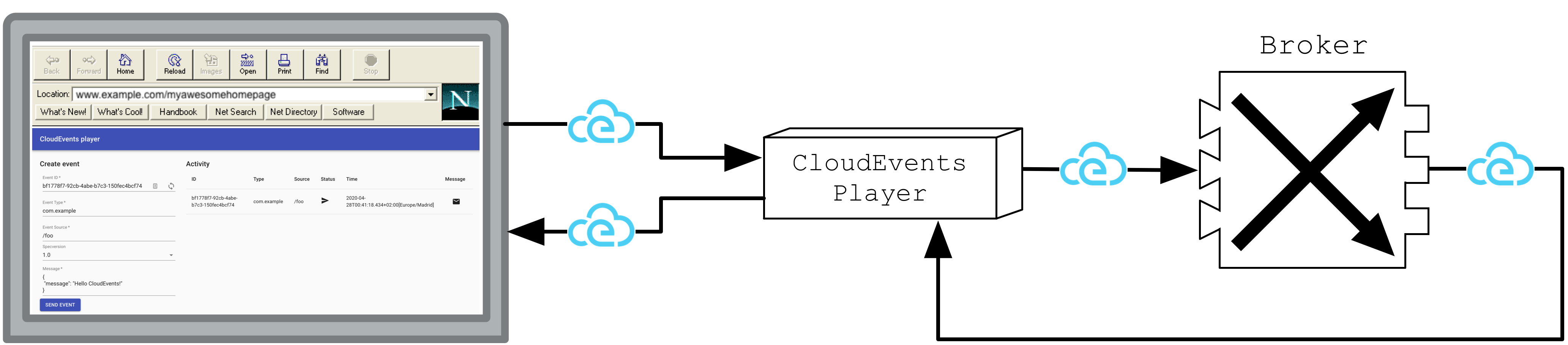
Send a CloudEvent through a Broker and use a Trigger to deliver it to a consumer (sink). The CloudEvents Player acts as both sender and consumer so you can observe delivery without writing code.
Prepare
-
Set up a cluster if you have not already done so, then return here with the
kind-knativecontext anddefaultnamespace. -
Confirm that the learning Broker (
example-broker) is ready:kn broker listexample-brokershould showREADY=True. This in-memory Broker is for learning, not production durability.
If the Broker is missing or not ready
Verify your learning context,
then inspect kn broker describe example-broker. If the Broker is missing,
Quickstart setup did not finish cleanly.
Connect the player
-
Deploy the CloudEvents Player as a Knative Service:
kn service create cloudevents-player \ --image quay.io/ruben/cloudevents-player:latest -
Create a SinkBinding so the player knows to send events to
example-broker, and wait until it is ready:kn source binding create ce-player-binding \ --subject "Service:serving.knative.dev/v1:cloudevents-player" \ --sink broker:example-broker kubectl wait sinkbinding/ce-player-binding \ --for=condition=Ready --timeout=120s -
Create a Trigger that delivers all events from
example-brokerback tocloudevents-player, and wait forREADY=True:kn trigger create cloudevents-trigger \ --broker example-broker \ --sink cloudevents-player kn trigger listConnect the consumer before sending an event — a Broker alone does not establish a delivery path.
Send and receive
-
Print the player URL and open it in your browser:
kn service describe cloudevents-player -o url -
Fill in the CloudEvent form (leave Event Subject blank and keep the preset Specversion). A CloudEvent pairs JSON data with standard attributes such as
type(a label for filtering) andsource(the producer identifier):Field Value Event ID tutorial-1(or another unused ID)Event Type dev.knative.tutorialEvent Source /tutorialSpecversion 1.0Message {"message":"Hello Eventing!"}Click SEND EVENT (Message must be valid JSON).
-
Check the Activity table for two entries with the same Event ID:
Status Event ID Event Type Sent — outgoing arrow tutorial-1dev.knative.tutorialReceived — checkmark tutorial-1dev.knative.tutorialClick the envelope icon in Message on the received row and confirm
id,type, anddata.message(Hello Eventing!). A sent row alone is not proof of delivery.
If you do not see a received event
Refresh the browser, then check readiness of all four resources:
kn broker list
kn service list
kn trigger list
kubectl get sinkbinding ce-player-binding
Describe any resource that is not ready (kn broker describe example-broker,
kn service describe cloudevents-player, kn trigger describe cloudevents-trigger,
kubectl describe sinkbinding ce-player-binding), or get help.
Do not apply the separate example from the advanced
Eventing troubleshooting guide just
to repeat these checks.
Filter events (optional)
Narrow cloudevents-trigger so it delivers only events of type
dev.knative.tutorial:
-
Add the type filter and confirm
READY=True:kn trigger update cloudevents-trigger --filter type=dev.knative.tutorial kn trigger list -
In the player form, send two events with fresh Event IDs:
- Type
dev.knative.tutorial→ appears as both sent and received. - Type
dev.knative.other→ appears only as sent (ignored by the Trigger).
- Type
-
Remove the filter to restore delivery of all event types, wait for readiness, and confirm a new
dev.knative.otherevent is now received:kn trigger update cloudevents-trigger --filter type-
Next steps
Keep your cluster if you want to try another track. Continue with Try Serving, Try Functions, or Next steps and cleanup.